Casio Education Australia
Register Log In
  • PRODUCTS
    • ClassPad (fx-CP400)
    • ClassPad Manager Software
    • fx-CG50AU
    • fx-CG50AU Manager Software
    • fx-82AU PLUS II 2nd Edition
    • fx-82AU PLUS II 2nd Edition Manager Software
    • fx-100AU PLUS 2nd Edition
    • fx-100AU PLUS 2nd Edition Manager Software
    • Data Projector
    • Discontinued Products
    • Product Warranty
    • Where To Buy
  • PROFESSIONAL DEVELOPMENT
    • Request a PD session
    • Self-Guided Online PD
  • CLASSROOM RESOURCES
    • Search
    • Classpad Series
    • Graphics Series
    • Scientifics Series
    • Videos For Learning
    • Replacement Units (Classpad)
    • Replacement Units (Graphics)
    • EAT Lesson Activities (Graphics)
    • EAT Lesson Activities (Scientifics)
    • VCE Study Resources
    • HSC Study Resources
    • QCE Study Resources
    • AC-M Year 10 Test Questions
    • Mental-jaunts
    • View All
  • DOWNLOADS
    • ClassPad
    • fx-9860G AU Series
    • fx-82AU PLUS
    • fx-100AU
    • fx-100AU PLUS
    • fx-100AU PLUS 2nd Edition
    • fx-82AU PLUS II
    • fx-82AU PLUS II 2nd Edition
    • fx-CG20AU
    • fx-CG50AU
  • PRIME SCHOOLS PLUS
    • Details
    • Join
  • HELP
    • ClassPad 300/330
    • ClassPad fx-CP400
    • fx-CG20AU/50AU
    • fx-9860G AU
    • fx-82AU Series
    • fx-100AU Series
    • Emulator / Manager software
    • Search
    • Ask us a question
  • CONTACT
    • Contact us
  • SERVICE & SPARE PARTS

ClassPad Manager for Windows 64-bit

If you own the ClassPad Manager for Windows OS 3.0 or later (32-bit) and require the 64-bit version, you can download it from http://edu.casio.com (free of cost) and install it on a PC running Windows 64-bit.

You must have a user account for this site (also free of cost) and be logged in. Navigate too, or visit https://edu.casio.com/download_service/download/class.php.

Tick the box as shown below and then click Next (bottom right).

You will be taken to the page (seen below). Click the link to download the software.

This will start the download of the installer file. When the installer file is fully downloaded to your PC double click the installer file and follow the instructions. You will be asked to enter an 'install key'.
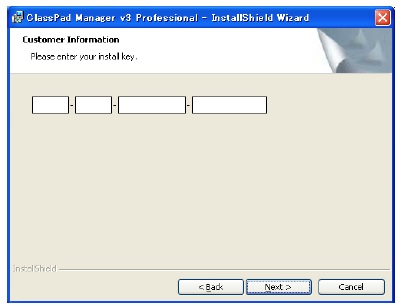
The install key you will require (if you have downloaded the software from the site above) is the install key from inside your original ClassPad Manager OS 3.0 or later 32-bit CD.

If you have any issues with this process, please contact us.


Shriro Australia Pty Ltd (ABN: 28 002 386 129) | Privacy Policy
Address: 104 Vanessa Street, Kingsgrove, NSW 2208 Australia | Phone : +61 (02) 9415 5521